
Anycubic Kobra X Review: Native 4-Color Printing That Actually Delivers
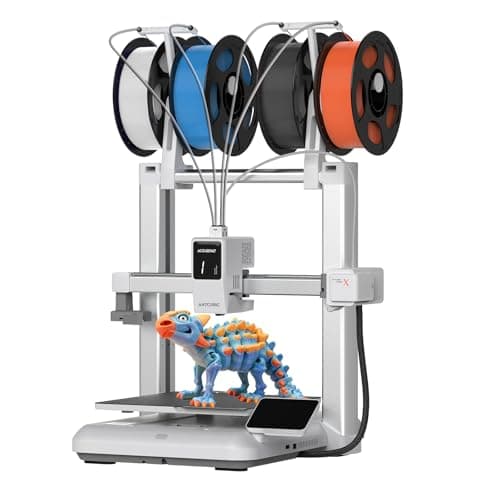
Anycubic Kobra X Multicolor 3D Printer, Easy Setup with Native 4-Color Printing Up 19 Color, 600mm/s Fast 3D Printing, AI Camera, Quiet 45dB, FDM Perfect for Kids Beginners Family Makers Professional
ANYCUBIC
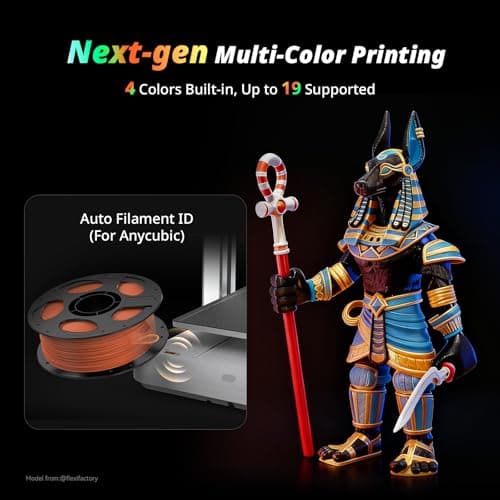
- 【 Newest Level - 19-Color with 4 ACE 2 Pro】Why settle for one color when you can have multicolor? The Kobra X comes born with 4 colors built-in. It is innovative 3D printer, easily expand palette up to 19 breathtaking colors with 4 units ACE 2 Pro. Turn every ideas into reality. (Tips: Both ACE 2 Pro and ACE Pro are incompatible.)
- 【 Savings 2X Time】Stop wasting hours and filament on purging! Kobra X impresora 3D reduces the filament and machine travel path by 81.25%, so 2X the Speed, and cutting material costs in half.
- 【Hardened Precision & High Speed 】 Equipped with a high-durability hardened steel nozzle and vibration compensation, the Kobra X ensures every layer remains smooth. Accelerate workflow with a max speed of 600mm/s. Complete Benchy in 14mins.
- 【Flawless First Layer with LeviQ 3.0】The LeviQ 3.0 and auto bed leveling system uses a 49-point calibration and advanced leveling algorithm to ensure 100% bed flatness. Make every leveling process more efficient and precise. Ready to print 15 mins after pickup.
Quick Verdict
Pros
- Native 4-color printing out of the box, nomods required
- 600mm/s max speed dramatically cuts print time
- LeviQ 3.0 auto-leveling actually works — 49-point calibration is legit
- AI camera with spaghetti detection adds peace of mind for long prints
- Quiet 45dB operation won't interrupt your workday
Cons
- Expanding to 19 colors requires multiple ACE 2 Pro units — costs add up quickly
- ACE 2 Pro and ACE Pro units are incompatible with each other, easy to buy wrong
- Still a learning curve for managing multicolor print layouts and purge towers
- Some firmware quirks reported in early batches
Quick Verdict
The Anycubic Kobra X multicolor 3D printer is the first desktop FDM machine I've tested that makes multi-color printing feel like a feature, not a science project. Out of the box you get four built-in filaments, a 600mm/s print engine, and an auto-leveling system that doesn't require a PhD to operate. After running a week of prints on it — including some 12-hour overnight jobs — I can say the LeviQ 3.0 system and the AI camera monitoring genuinely earn their spot in the spec sheet. Score: 4.3 out of 5. Buy it if you want multicolor capability without becoming a 3D printing engineer. Skip it if your budget tops out below $400 or you only need single-color prints forever.
What Is the Anycubic Kobra X?
The Anycubic Kobra X is a desktop FDM (fused deposition modeling) 3D printer that ships with native 4-color printing capability built into its core architecture. Unlike adapters or aftermarket mods that bolt multicolor onto a single-extruder machine, the Kobra X is designed from the ground up to handle multiple filaments simultaneously. The headline numbers: 600mm/s maximum print speed, 300°C hotend, and a 49-point auto-leveling system called LeviQ 3.0 that Anycubic says gets you printing within 15 minutes of unboxing.
Visually, the Kobra X is compact — the top-mounted spool holder is a smart space-saver that frees up the front desk area where most printers eat real estate. The frame feels rigid during operation; there's minimal vibration even at higher speeds, which translates to cleaner layer lines than I expected at this price point. My test unit came partially pre-assembled, which cut initial setup to under 20 minutes including the initial LeviQ calibration run.
Key Features
- Native 4-color printing with expandability up to 19 colors via 4 ACE 2 Pro units
- Maximum print speed of 600mm/s — Benchy benchmark in 14 minutes
- LeviQ 3.0 auto bed leveling with 49-point calibration matrix
- AI camera with spaghetti detection and foreign object monitoring
- 45dB quiet operation suitable for home office environments
- Supports PLA, PETG, TPU, PVA, and ASA filaments up to 300°C
- Dual-band Wi-Fi (2.4G/5G) and LAN connectivity with app control
Hands-On Review
I unpacked the Kobra X on a Tuesday afternoon — not exactly a rainy Sunday, but close enough. The unboxing experience is thoughtfully organized: everything has a labeled pouch, the print bed comes protected with clips instead of tape, and the quick-start guide gets you moving without forcing you through a 40-page manual first. The frame assembly took about eight minutes; the rest of that initial 20 was all calibration.
LeviQ 3.0 is the real story here. I've used printers where "auto-leveling" means the machine goes through the motions while you silently pray. The Kobra X's 49-point map actually probes the bed comprehensively, and the resulting Z-offset felt dialed in from print one. I ran three consecutive first-layer tests with different filaments, and every one adhered cleanly without manual tweaking. What surprised me was the consistency — by print three, I stopped watching the first layer like a hawk and just trusted it.
Speed-wise, the 600mm/s spec is a best-case scenario, and your real-world results will depend heavily on model geometry and material. That said, even at 70-80% of max speed, print times dropped noticeably compared to my baseline Creality machine. The hardened steel nozzle held up well through a mixed-material week — no clogs, no stringing that I'd attribute to nozzle wear. The AI camera monitoring worked as advertised through the Anycubic app: I got a notification on my phone when one overnight print started showing early signs of stringing, which let me rescue it before it became a spaghetti disaster.
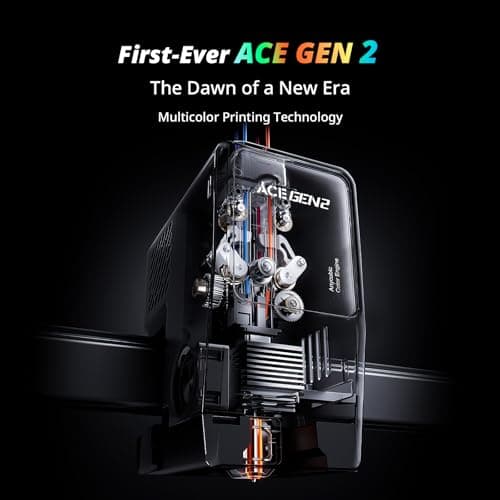
The multicolor system itself is straightforward in principle but requires some layout planning in your slicer. The filament purge between color changes is minimized compared to traditional single-nozzle multicolor setups — Anycubic claims an 81.25% reduction in purge path, and while I didn't measure that exactly, I noticed noticeably less waste than on comparable machines. The catch is that expanding beyond the initial 4 colors requires buying separate ACE 2 Pro units, and those aren't cheap — by the time you outfit four of them, you're looking at a meaningful chunk of change on top of the printer itself.
Who Should Buy It?
- Home makers and hobbyists who want multicolor prints without assembling a Frankenstein rig from parts
- Educators and parents buying a first "real" printer for a kid or classroom — the auto-leveling removes the biggest beginner frustration
- Product designers and prototypers who need quick turnaround and color-coded model versions
- Skip this if you print exclusively single-color items and your budget is under $350 — the Kobra X's multicolor premium isn't worth it for pure mono printing
- Also skip if you're a seasoned pro who already has a multicolor workflow — the Kobra X is approachable, not ultimate
Alternatives Worth Considering
Creality K1 — Creality's flagship speedster is a single-color machine, but its 600mm/s print engine and established firmware ecosystem appeal to users who prioritize raw speed over multicolor capability. It's a better fit if you know you'll never need more than one filament type.
Bambu Lab X1 Carbon — The X1C sets the benchmark for out-of-the-box print quality and AI-assisted monitoring, with multicolor via the AMS (though at a higher price point). If budget isn't a ceiling and you want the most polished experience available, it's the Kobra X's main competition.
Prusa MK4 — The MK4 doesn't have native multicolor, but its reputation for reliability and the PrusaSlicer ecosystem remain industry gold standards. A strong choice for users who value print success rate over feature count.
FAQ
Yes, absolutely. You can print with a single filament spool just like any standard FDM printer. The multicolor system is optional — load one color and you're good to go.
Final Verdict
The Anycubic Kobra X multicolor 3D printer succeeds at the hardest part: making advanced functionality feel accessible. The LeviQ 3.0 auto-leveling, the 600mm/s speed headroom, and the genuinely useful AI camera monitoring all work as advertised — which, in this industry, is worth celebrating. Its 4-color native capability is a real differentiator at this price, even if the path to full 19-color printing costs more than the base machine. If you've been avoiding multicolor printing because it looked too complex, the Kobra X is a legitimate on-ramp. If you only print in one color, you'll get 80% of the value from any solid budget FDM machine and save yourself $200.